If you don’t show up online, you might as well not exist. That’s increasingly becoming the reality for small businesses in the modern world.
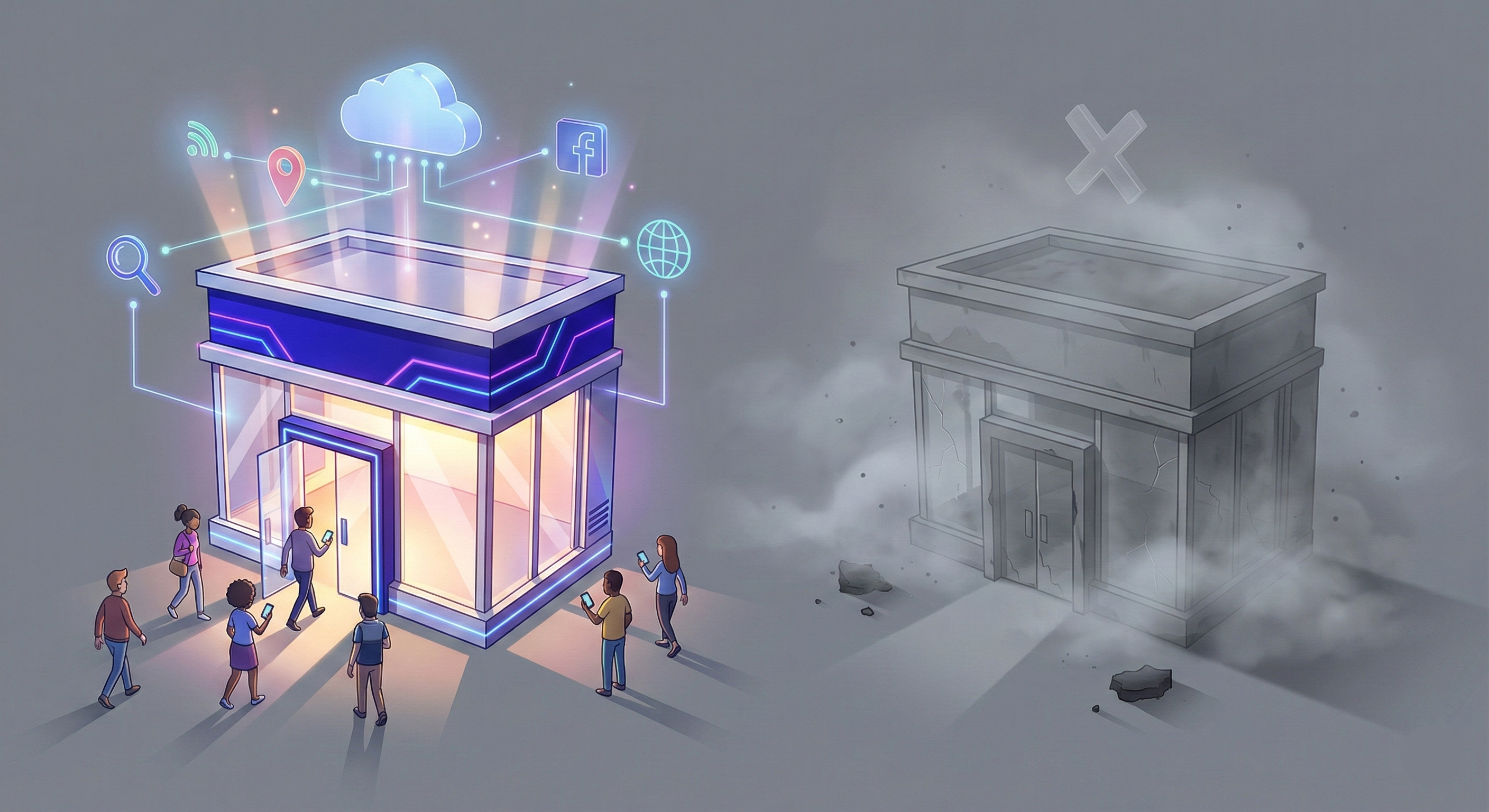
Your competitors have one. Your customers expect one. And if you’re still on the fence about whether you actually need a small business website, the answer is yes—you do. A solid website builds trust, brings in new customers, and works for your business even when you’re closed.
Websites can look complicated at first, but I’ll walk you through what you need to know from the perspective of a small business owner, not a marketing nerd. What actually matters, and what’s just marketing hype?
Why You Need a Website
Your customers are only getting younger, and you need to meet them where they are. If you don’t adapt to their preferences and habits, they’ll move on without a second thought.
This next generation of consumers grew up with TikTok brain. Their attention spans are shorter, their expectations are higher, and they won’t think twice about choosing your competitor if you don’t show up where they’re already looking. If your business doesn’t exist online, it doesn’t exist to certain people.
Trust and Credibility
Studies show that people judge your entire business within the first few seconds of landing on your website. That’s it. A few seconds.
You’ve seen those old, clunky government websites that look like they haven’t been updated since 2003. What’s your first thought? Probably that whoever runs it doesn’t care enough to fix it. The same goes for your business. If your site looks outdated or unprofessional, visitors assume you don’t care, or worse, that you’re not trustworthy.
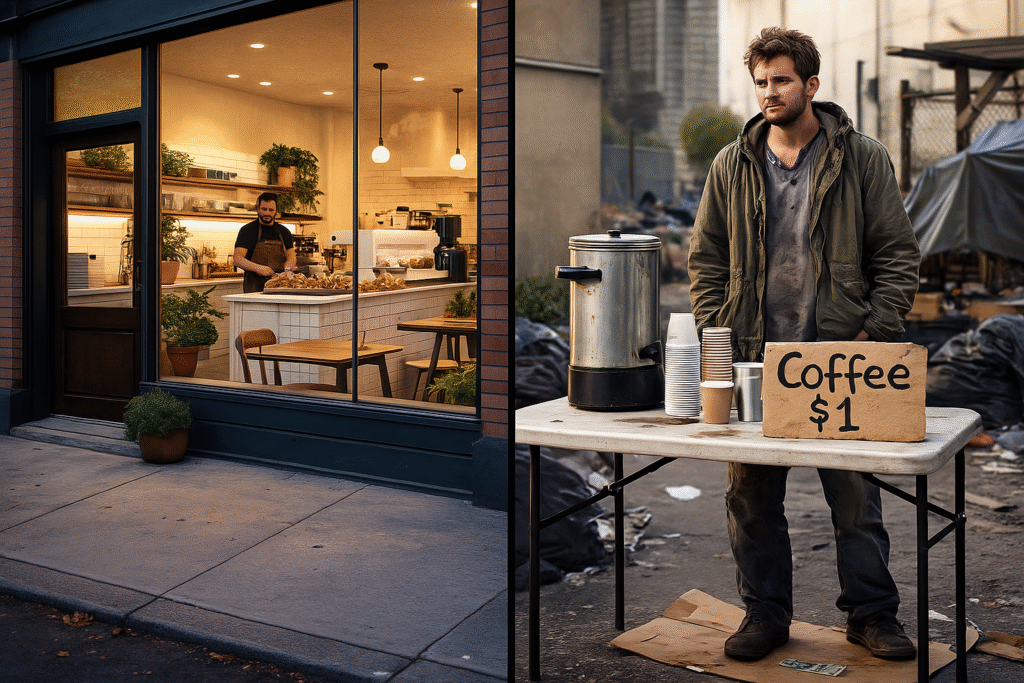
Websites are like the modern version of a storefront. Here’s what I mean: imagine you’re walking down a sketchy neighborhood and you see a run-down coffee shop—poorly maintained, uninviting, windows dirty. Then just a block down the road, there’s another coffee shop that’s pristine, welcoming, and clean. Which one would you buy from?
Now take it a step further. Who would you trust more—someone selling coffee out of a picnic table set up on the street, or an actual coffee shop with a real storefront? Most people would choose the actual place. That’s exactly what a website does for your business online. It’s proof that you’re legitimate, established, and worth trusting. Without one, you’re just the person on the street corner. Not to say one is better than the other, but perception matters.
Business Hub
Your website works when you don’t. It’s there at 2 a.m. when someone Googles your service. It’s there on weekends when you’re closed. It takes some of the repetitive work off your plate, such as answering questions.
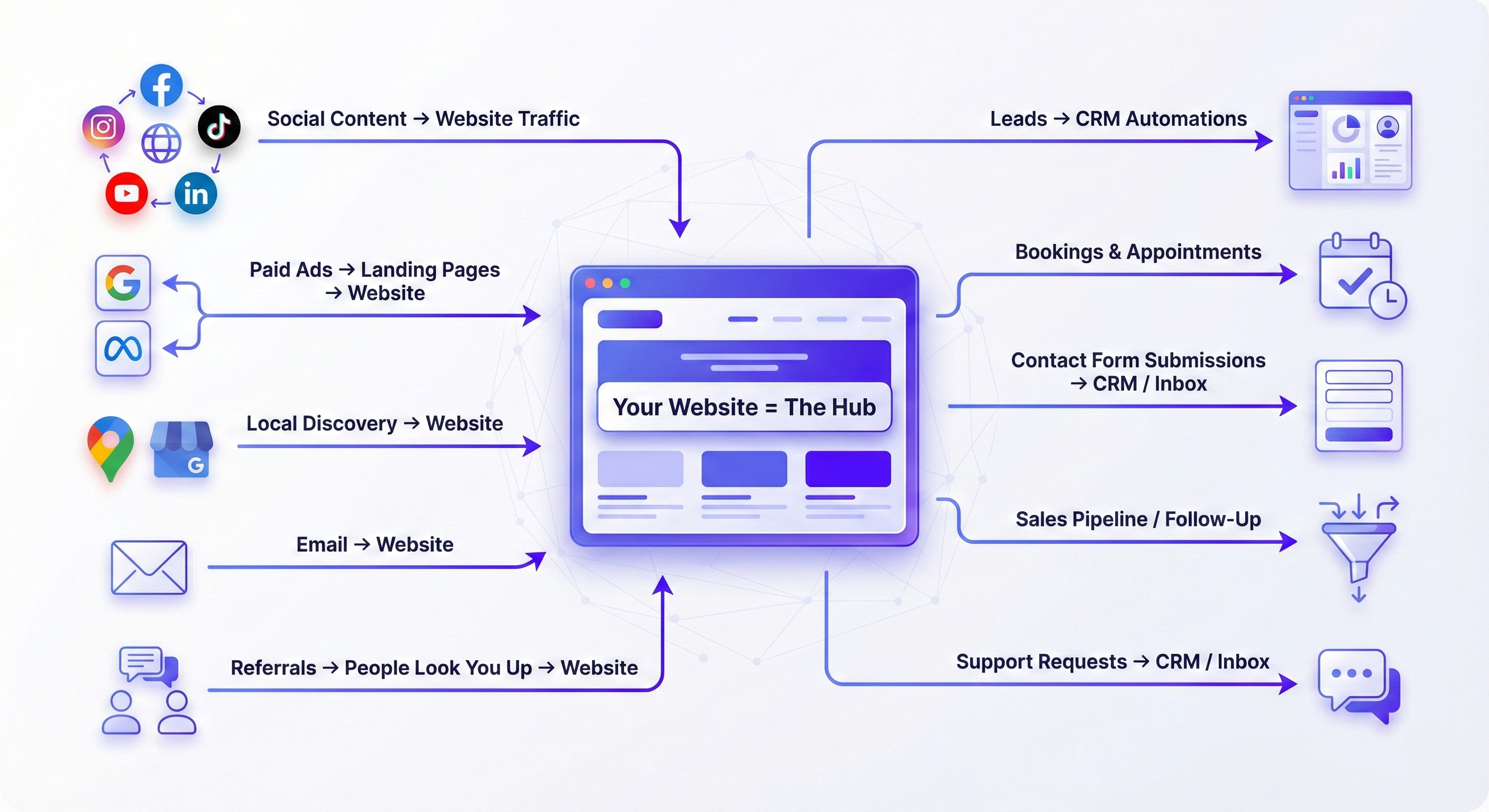
Everything flows back to your website. Your social media posts, your Google ads, your email campaigns—they all lead people to one place. That’s where they learn about you, decide if they trust you, and ultimately, take action. Whether that’s filling out a form, booking a call, or making a purchase, your site is the hub that turns awareness into interest and interest into revenue.
And it’s not just about capturing leads. Your site is also your reputation center. You can showcase Google reviews, testimonials, and case studies in a clean, organized way that builds confidence. It’s where people go to confirm or deny that you’re the right choice.
Websites 101: What is a Website?
Let’s talk about the technical stuff without getting too nerdy. You don’t need to be a developer to understand the basics—but you do need to know enough to make smart decisions and avoid getting taken advantage of.
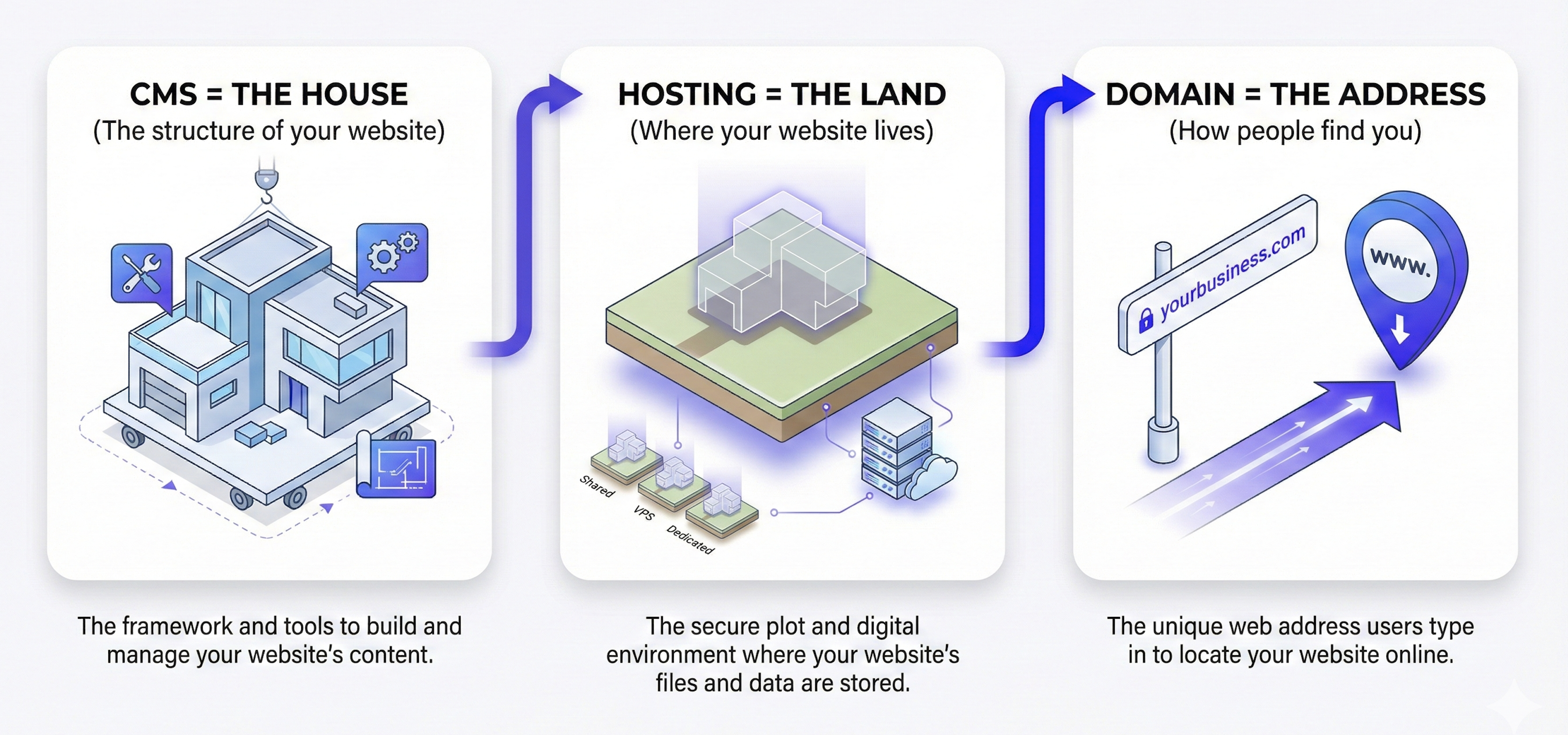
At its core, every website is built on three foundational pieces: a CMS (content management system), hosting, and a domain name. Think of your CMS like the house you build, your hosting like the land it sits on, and your domain like the address that tells people where to find you.
CMS: The House You Build
Your CMS is the actual house—it’s what you build and customize. It determines how everything looks, how it’s organized, and how you control it. When you build a “website”, it’s really just a bunch of files on a CMS that determines how it’s visually displayed on the internet.
WordPress, for example, is a CMS. So are Wix, Squarespace, and Shopify. Here’s the key difference: with WordPress, you can move your house to a different piece of land if you need to. If your current hosting isn’t working out, you can pack up your entire WordPress site and move it to a new host without losing anything. The land changes, but your house stays the same.
Imagine being able to pick up your entire house and relocate it to a different plot of land. That’s exactly what you can do with a CMS like WordPress—you’re not stuck in one place forever.
Hosting: The Land Where Your Site Lives
If your CMS is the house, hosting is the land it sits on. It’s where your website files are stored so people can access them when they visit your site. You can move your website files from one hosting company to another whenever you want—kind of like picking up your house and relocating it somewhere else.
There are infinite hosting companies out there, all with their own pros and cons. Don’t overthink it. Just understand what hosting is and how it fits into the bigger picture. As long as your hosting is fast, reliable, and secure, you’re in good shape. Slow hosting means slow load times, which means frustrated visitors who leave before your page even loads.
Domain Name: Your Unique Address on the Web
Your domain name is your address on the internet. It’s the “yourbusiness.com” part that people type into their browser. Think of it like 123 Main Street, Miami, Florida—except you can move it.
Your domain is just an address that points people to wherever your house (CMS) is located. Someone types your domain into their browser like entering an address into GPS, and no matter where you’ve moved your house or what piece of land (hosting) it’s sitting on, as long as your domain is pointed to that location, people will find you.
And just like there’s only one 123 Main Street in Miami, Florida, there’s only one Amazon.com in the entire world. Once you claim a domain, it’s yours. No one else can have it.
Your domain should be easy to spell, memorable, and ideally be available across social media platforms too. If you snag MyCompany.com, make sure you can also get @MyCompany on Instagram, Facebook, and wherever else your customers hang out.
Which Website Platform Should I Choose?
Not all website platforms are created equal. And honestly, the one you choose can make or break your long-term success. A website platform (or CMS) is the software you use to build and manage your site. The most popular options are WordPress, Wix, Squarespace, Shopify, and more recently, AI-powered builders that promise to create your entire site with a single prompt.
Platforms like Wix and Squarespace bundle everything together—domain, hosting, and the builder itself—all in one place. On the surface, that sounds convenient. And for absolute beginners, it can feel easier to get started. But here’s the catch: you’re locked into their ecosystem. You don’t truly own your site. You can’t take it with you if you outgrow the platform. And you’re limited to whatever features and apps they offer, which can get restrictive fast.
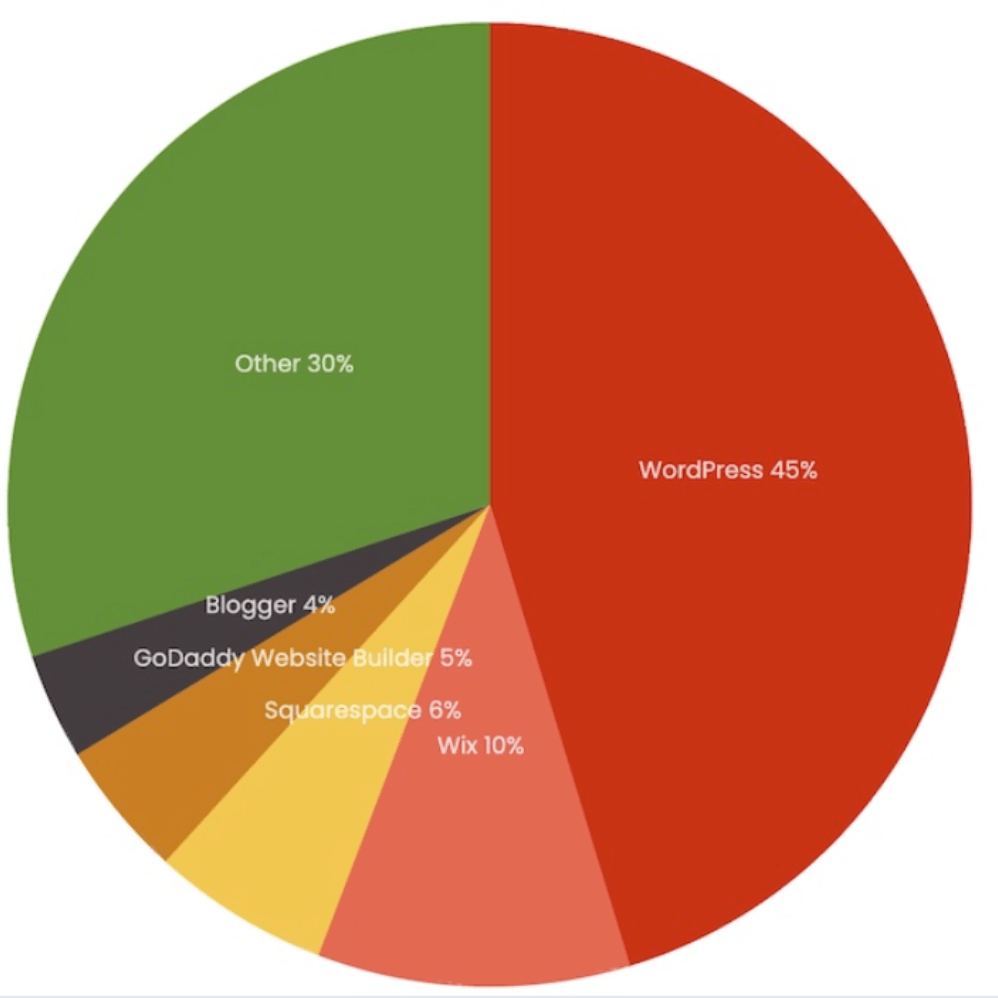
WordPress, on the other hand, is different. It’s open-source, which means you own your site. You can move it from host to host. You can customize it endlessly. And because 45% of all websites on the internet are built on WordPress, there’s a massive ecosystem of plugins, themes, and developers who can help you do basically anything.
The Truth About “Easy” Website Builders
You’ve probably seen the ads: “Build a website in 5 minutes with AI!” or “Create a stunning site with no coding required!” Platforms like Wix, Squarespace, AI builders, and even Shopify (for e-commerce) all market themselves on ease of use, convenience, speed, and affordability. And to be fair, they can get you online quickly.
These platforms are fine if all you need is a basic online brochure. But if you want to add extra functionalities, integrate with CRMs, and add advanced features you don’t know you need yet, you’re going to hit walls quickly. You’re limited to whatever their ecosystem offers, and when you need something they don’t support, you’re stuck.
And let’s be real: a lot of the hype around these platforms—especially AI builders—comes from affiliate promotions. Those YouTube videos promising instant websites? They’re getting paid when you sign up. That doesn’t mean these tools are useless, but don’t fall for the marketing. The goal of a website is to grow past just being pixels on a screen, and the “easy” route often costs you more in flexibility, ownership, and long-term scalability.
Why WordPress Is the Best Platform
Because so many sites are built on WordPress, developers flock to it to build plugins. Think of plugins like “apps” for your website. That means if there’s a feature you need, there’s probably already a plugin for it. And if it doesn’t exist on WordPress, it probably requires custom coding.
A good analogy is the iPhone, once Apple dominated the market, developers started building for iOS because that’s where the users were. Nobody’s really building apps for Microsoft phones due to lack of demand. WordPress is the same. It’s the ecosystem with the most tools, the most support, and the most options. If you need something custom, someone’s probably already built it.
That’s the long-term advantage. You’re not betting on a niche platform that might disappear or limit your growth. You’re building on the most popular, most supported website platform in the world.
How Do You Maintain a Website?
Building a website isn’t a one-and-done deal, websites need maintenance. Maintenance includes things like updating plugins, security patches, checking site performance, creating backups, and troubleshooting issues when something breaks. The more functionality you have on your site, the more likely something will eventually break at some point. If you’re on WordPress, this is all on you (or whoever you hire). If you’re on Wix or Squarespace, they handle a lot of it—but remember, you’re still paying for it, and you’re still locked into their system.
If you go the WordPress route, you have two options: manage it yourself or hire someone to do it for you. Managing it yourself is doable if you’re tech-savvy and have the time. But most small business owners don’t. That’s why maintenance plans exist. For a monthly fee, an agency keeps your site updated, secure, and running smoothly so you can focus on your business. If something breaks after an update, a good agency will fix it as part of your maintenance plan.
How Should You Design Your Website?
Good design isn’t about making your site look cool. It’s about making it work for your customers. That means fast, clear navigation, and on whatever device they’re using.
Most people browse websites on their phones now. That means your site has to be mobile-optimized. Every page, every button, every form—it all needs to work seamlessly on a small screen. Buttons need to be big enough to tap with a thumb. Text needs to be readable without zooming in. If your site doesn’t work on mobile, you’re losing customers before they even know what you offer.
Keep It Simple and Professional
Less is more. The days of flashy websites with ten different fonts and rainbow color schemes are long gone. Modern design is clean, simple, and focused. Look at any major brand—they use a couple fonts max, a minimal color palette, and plenty of white space.
Simple design builds trust. It makes your site easier to navigate, faster to load, and more professional. And it keeps the focus on what matters: your message and your offer. Nobody’s visiting your site to admire the design. They’re there to solve a problem or get information. Make it easy for them.

Invest in High-Quality Media Content
If you want to build trust, use real photos of your team, your work, and your customers. People connect with authenticity. They want to see the real business, not some stock image that’s been used on a thousand other websites. Original content—photos, videos, etc… makes your site feel legitimate and professional.
Even if you’re hiring someone else to design and build your website, it’s important to give them as much media to use as possible. If you don’t give them anything to work with they’re just going to use stock images and stock videos.
What Pages and Functionality Do I Need for My Website?
Too many business owners get caught up in making their site look impressive. They spend hours agonizing over the font or adding fancy animations. But here’s the hard truth: nobody cares. Visitors don’t have time to admire your design or read your life story. They’re on your site for one reason—to see if you can solve their problem.
That means your site needs to be structured around their needs, not your ego. Every page should have a purpose and answer the questions they may be asking: What do you do? How can you help me? How much does it cost? What do I do next? If your site doesn’t answer those questions quickly and clearly, people will leave.
The Core Pages Most Websites Need
Most small business websites need four pages or less: Home, About, Services or Products, Contact.
Your Home page is your first impression. It should immediately tell visitors what you do and who you help. Don’t bury the lead. Make it obvious.
Your About page isn’t really about you—it’s about why visitors should trust you. Focus on your experience, your values, and how you help customers. Keep it customer-focused, not self-centered.
Your Services or Products page should educate and address objections. What do you offer? How does it work? What does it cost? This is where you move people closer to saying yes. And every service page should have a clear next step—whether that’s booking a call, requesting a quote, or filling out a form.
Your Contact page should make it ridiculously easy to get in touch. Phone number, email, form—whatever makes sense for your business. Don’t make people hunt for it.
Another common “page” is the Blog. They help you rank in Google, answer common questions, and drive traffic to your site. Think of your blog as your own mini social media platform—except you control it.
And then there’s other pages on a case by case basis. This ranges from anything from Terms of Service pages to Landing Pages and everything in between. Be sure to do your research on what might be needed for your industry and business.
Conversion-First Structure
Every visitor lands on your site with one question in mind: “What’s in it for me?” If your site doesn’t answer that immediately, they’re gone.
This is where conversion-focused design comes in. Your site needs to guide people from curiosity to action with as little friction as possible. That means clear headlines, obvious benefits, and strong calls to action (CTAs) where applicable.
Don’t make people work to figure out what to do next. If they’re interested, give them a button. “Book a Call.” “Get a Quote.” “Schedule a Consultation.” Make it big, make it obvious, and make it easy. Most people don’t care about your fancy design. They care about whether you can solve their problem, how fast you can do it, and how much it’ll cost. Answer those questions upfront, and you’ll convert more visitors than you ever would with a flashy homepage.
Maximizing Conversions with Actionable Features
Every page should have a purpose. If a page doesn’t directly or indirectly move someone closer to becoming a customer, it’s wasting space.
CTAs are your best friend here. Whether it’s a “Call Now” button or a “Read More” on a blog, every page should nudge visitors down your sales funnel to an eventual sale.
Additional Interactive Features Worth Considering
The amount of options for website functionality is massive. You can add forms that feed into your CRM. You can add scheduling tools so customers can book appointments directly. You can even add AI chatbots and voice agents that handle FAQs and lead capture while you sleep.
Don’t fall for every shiny new feature. Ask yourself if it actually supports your business goals. Will it help you get more leads? Will it save you time? Will it improve the customer experience? If the answer is no, skip it. Focus on what moves the needle forward.
Do I Need SEO?
SEO. It’s one of those terms that gets thrown around constantly, but most people don’t actually know what it means—or how much work it really takes. Let’s clear something up right now: if someone offers to build your website for $1,000 and says “SEO is included,” they’re giving you the absolute basics. Actual SEO—the kind that gets your site ranking on Google, is very time consuming, and it’s not a one-time thing. It’s ongoing work.
SEO stands for Search Engine Optimization, and it mostly refers to Google since that’s where most of business searches happen. But there’s also a new term you’ll start hearing more: GEO, or Generative Engine Optimization. That’s about getting found by AI tools like ChatGPT, Gemini, and other large language models. Both matter, and both take serious effort.
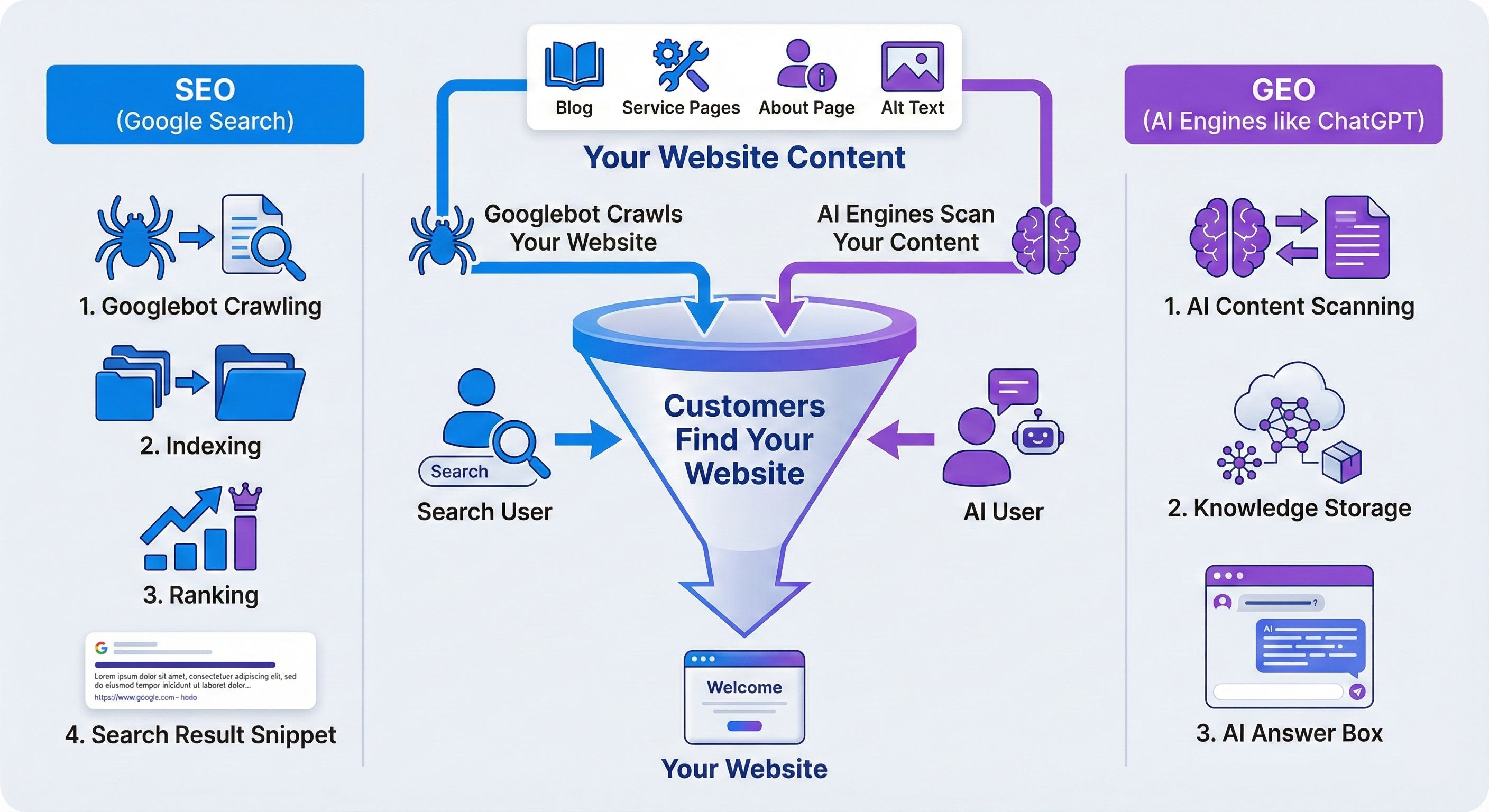
Think of SEO like posting on social media to drive traffic—except the platform is Google, and increasingly, AI platforms like ChatGPT. There are plenty of resources to learn it yourself, and whether you hire someone or go solo, even a little effort beats nothing. In the long run, it pays off. Unlike social media, where content is fleeting and algorithms prioritize fresh posts, Google rankings are more persistent. Once you rank, it’s very beneficial for revenue and takes less effort to maintain. It is definitely a worthy investment if you can afford it.
Beyond Your Website
Your website is the hub, but it’s not the whole picture. To really grow your business presence online, you need to think beyond just the site itself.
Social media, email marketing, paid ads, Google reviews—all of these channels should work together, with your website at the center. Social media is where you meet people. Your website is where you convert them.
For example, you post a video on Instagram showing off your work. Someone watches it, clicks the link in your bio, and lands on a service page on your website. From there, they fill out a form or book a call. That’s the ecosystem in action. Every channel feeds into the website or a landing page, which turns interest into revenue.
Choose social platforms that align with your business and target audience demographics. The goal isn’t just traffic—it’s qualified traffic. A viral cat video might rack up millions of views but generate zero revenue. Meanwhile, a small local plumber’s post seen by someone whose toilet just exploded? That leads to actual business.
How Much Does a Website Cost?
The cost of a website varies significantly—you’ll see many different prices from different providers. It’s hard to gauge because it depends on who’s building it and what functionalities you need. Use this post as a guide to educate yourself on what goes into a website, then get a few quotes and compare. On average, you can expect a 3-5 page website built on WordPress ranging from $1,500 to $3,500 for basic functionalities.
DIY vs. Professional Investment
“Easy” DIY platforms like Wix and Squarespace advertise low monthly fees, but their base plans often lack essential features so be sure to read the fine print.
WordPress pricing is different. You pay for hosting ($10-$50/month), a domain ($10-$20/year), and design work. Professional builds cost more upfront but give you a scalable site you actually own—meaning you can move it, modify it, and grow it without starting over.
Consider your time. Building a site—even on “simple” platforms—takes significant time. As a business owner, your time is usually better spent running your business while a professional builds it right the first time.
Ongoing Costs
Plan for recurring expenses: domain renewals, hosting, plugin updates, and security. Marketing agencies often have maintenance plans typically running $50-$200/month and cover updates, backups, security, and troubleshooting—basically, peace of mind.
DIY platforms handle maintenance automatically, but you’re still paying for it in monthly fees while remaining locked into their platform.
Bottom line: a well-managed WordPress site often costs the same or less than a fully-featured Wix or Squarespace plan. Look at total cost of ownership after the time investment and possible resources spent on troubleshooting when something breaks, not just the monthly fee.
Your Website Is an Investment, Not an Expense
A website isn’t just another line item on your budget. It’s the foundation of your digital presence, the hub for all your marketing, and the tool that works for you around the clock. Yes, it costs money. Yes, it takes effort. But done right, your website pays for itself many times over, usually pretty quickly. It builds trust, captures leads, and grows with your business. And in today’s low attention span world, it’s not optional—it’s essential.
We may be biased, but for most small businesses, we offer web design services that will likely fit your needs. If you want to learn more, check out our Pricing Page.